Demo coming soon
Coming soon
by Monarch Interactive
Drag the sun. Change the weather. Shape the sound.
Buy Stratos – $19.99
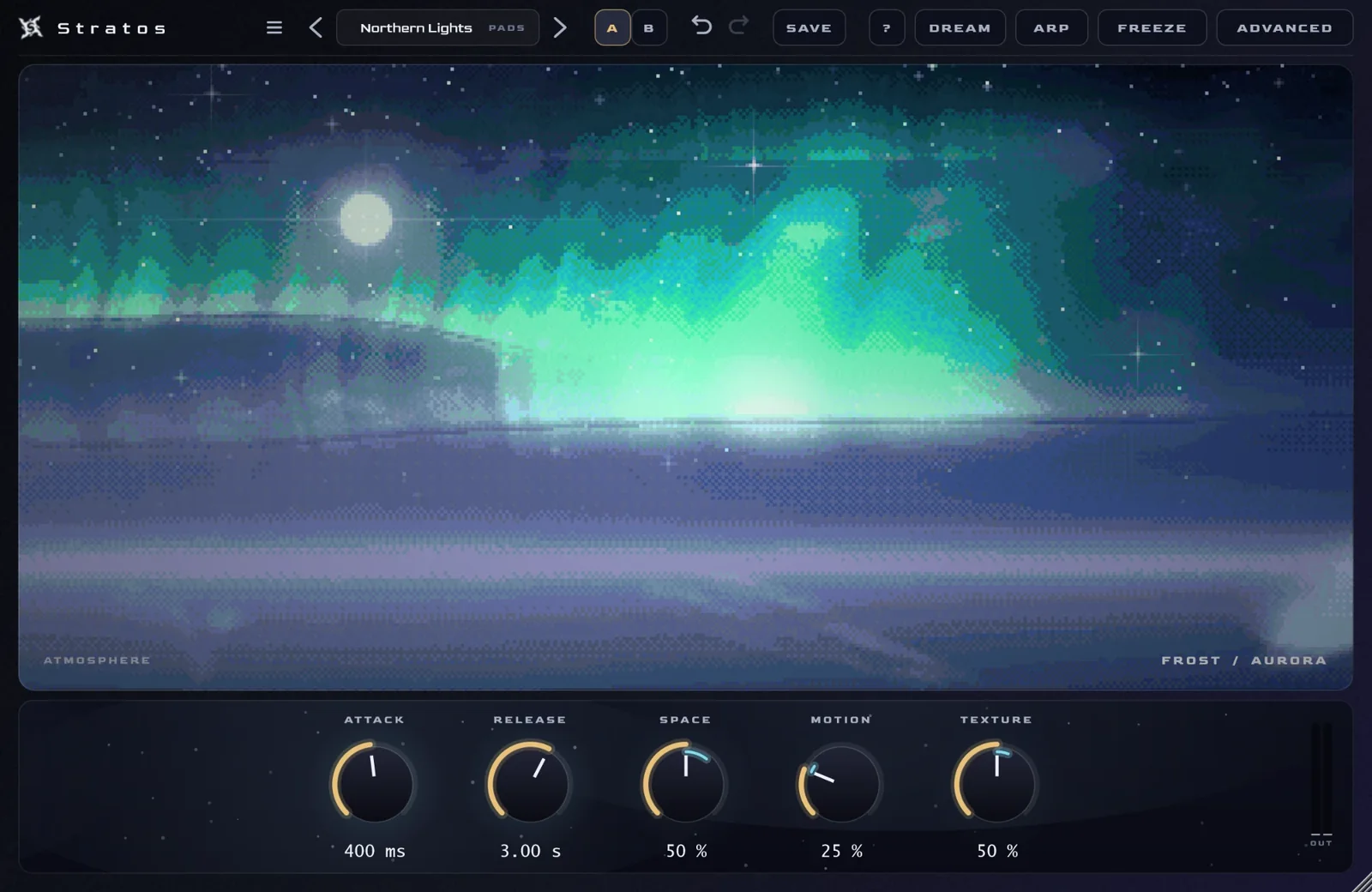
The Sky
Drag the sun. The weather follows. The sound follows the weather.
Stratos is an atmospheric hybrid synthesizer built around a living, pixel-art sky. You move a sun across it, and where the sun sits sets the weather. The weather shapes the sound.
Storm
Frost
Dusk
Clear
The Atmosphere
Everything in plain words
136 presets
Eight categories — Pads, Keys, Bells, Leads, Arps, Textures, Bass and Vox — plus nine mood collections, including MIDNIGHT: night-time pads, basses and arpeggios for atmospheric R&B and melodic hip-hop.
Hybrid engine
An analog-style layer plus three hybrid layers, drawing on 8 wavetables, 12 built-in instruments (6 of them vocal sounds) and noise. Filters with their own envelopes, LFOs, unison and glide.
Signature modes
- Aurora Mode — northern lights that follow your chords.
- Dream Generator — the sound slowly evolves on its own; Capture keeps a moment you like.
- Moon Mode
- Eclipse — one control for build-ups.
Arpeggiator + phrase generator
The phrase generator writes melodies from the chords you play. Export what it makes as MIDI.
Effects
Nine distortion types, Crystal Echo, delay, chorus and a shimmer reverb.
Made to work fast
Five themes plus custom colors, a built-in help center and guided tutorial, undo and redo, A/B compare and favorites. Every control can be automated.
The Sound
Hear it before you buy
Video demo coming soon
Demo coming soon
Demo coming soon
Demo coming soon
The Experience
Look around
Real screenshots of Stratos. Select one to see it full size.
The Journey
From checkout to playing
- Buy Stratos for $19.99, one time.
- Your licence key and download link appear on screen right after you pay.
- Install Stratos.
- Open Stratos in your DAW.
- Paste your key. Done.
One licence key works on up to 3 of your own computers. Activation happens once, online; there's an offline option for computers without internet.
System requirements
What you need
| Operating system | Windows 10 or 11, 64-bit |
|---|---|
| Plugin format | VST3 |
| Hosts | FL Studio, Ableton Live, Bitwig, Cubase, Reaper, Studio One and other VST3 hosts |
| Mac | Not available yet |
| Activation | Once, online — or offline if that computer has no internet |
FAQ
Questions
Can I try it first?
Listen to the audio demos and watch the video on this page.
How many computers can I use it on?
One licence key works on up to 3 of your own computers.
Can I activate without internet?
Yes. Activation normally happens once, online, but there's an offline option — the steps are in the Support section below.
Is there a Mac version?
Not yet. Stratos is Windows 10/11 (64-bit, VST3) for now.
Can I get a refund?
No. All sales are final. Stratos is a digital product, so there are no refunds once your licence key has been issued.
I paid but didn't get my key
Your key and download link show on screen right after payment. If you closed the page before saving your key, email [email protected] with the email you paid with and we'll send it to you.
What data does activation send?
Only your licence key, an anonymous computer ID and the computer's name, once, when you activate. Stratos does not track how you use it. More in our privacy policy.
Can I use sounds made with Stratos in my music?
Yes. Sounds you make with Stratos are royalty-free in your music.
Support
Need help?
Get in touch
Email [email protected]. Include your order number if your question is about a purchase.
Offline activation
- Open Stratos and press
UNLOCK. - Choose
No internet on this computer? - Press
COPY ID. - Email the ID with your order number to [email protected].